Posts

How to add the Adobe Flash Player on Windows server 2016

Image
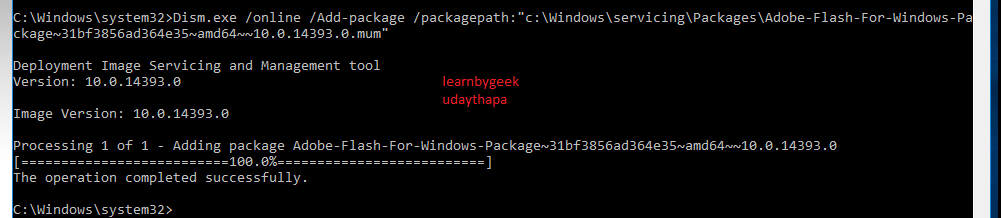
How to add the Adobe Flash Player on Windows server 2016  No need to download Adobe flash player in window server 2016 . Open CMD as an administrator and run below command  and reboot the server . dism /online /add-package /packagepath:”C:\Windows\servicing\Packages\Adobe-Flash-For-Windows-Package~31bf3856ad364e35~amd64~~10.0.14393.0.mum”

BRING DISK ONLINE ON HYPER-V 2016 CORE

Image
BRING DISK ONLINE ON HYPER-V 2016 CORE  login into the Hyper-V core server  Type "powershell" in cmd Type "get-disk" Select those disk which you want to bring online  Type "set-disk -Number 1 -IsOffline $false"

Window Server 2016 Hyper-V Nested-Virtualization on Virtual Box LAB

Image
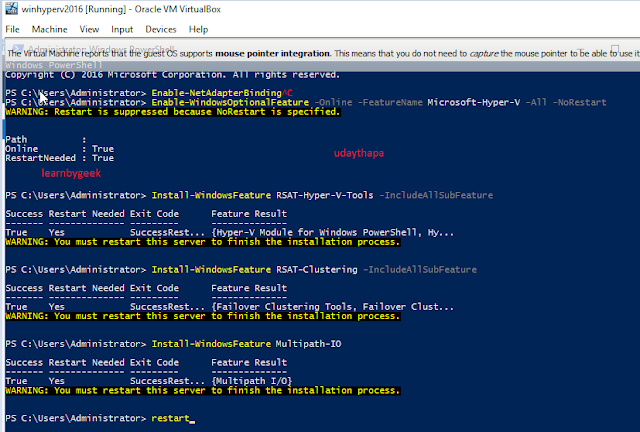
Window Server 2016 Hyper-V Nested-Virtualization on Virtual Box LAB   Enable Hyper-V feature in Window server 2016   Enable-WindowsOptionalFeature –Online -FeatureName Microsoft-Hyper-V –All -NoRestart Install-WindowsFeature RSAT-Hyper-V-Tools -IncludeAllSubFeature Optional :- Install-WindowsFeature RSAT-Clustering -IncludeAllSubFeature Install-WindowsFeature Multipath-IO Restart-Computer 2. Enable Nested feature in Hyper-V 2016 Virtual Machine Set-VMProcessor -VMName <VMName> -ExposeVirtualizationExtensions $true In My Lab : testVM created on HyperV server which is hosted in VirtualBox

VMware-(VCP-DCV) and Windows-(MCSA) Server Home Lab with AMD CPU Ryzen 2700x

Image
VMware-(VCP-DCV) and Windows-(MCSA) Server Home Lab with AMD CPU Ryzen 2700x  *I purchased below  configuration  for home LAB: CPU : AMD Ryzen 2700x MotherBoard: AX370 Gaming K3  (f20 BIOS) RAM : 16GB DDR4 Adata Power supply : Corsair 650 Watt  Hard Drive : 240GB Sata & 1TB WD  Workstation : Window 10 OS. ISSUE  I have installed VMware workstation & Virtual Box for creating multiple VM's  I have tested by creating Window2016 &  linux OS , its working fine. But whenever i have installing the VMware ESXI 6.0 & 6.5 its gives warning massage "CPU not list in HCL(vmware hardware compatibility list)" After installation boots normally ESXI VM's but problem is whenever i am trying to create the Virtual machine onto ESXI server(VM) , server gets hanged in Pink screen(PSOD). Social sites :  https://social.technet.microsoft.com/Forums/en-US/10560b39-a2d6-4e4e-b181-613a9023e311/nested-vi...